AI UGC videos: make UGC with your character
UGC in Sozee makes the kind of video people film on their phone: a review, a storytime, a day in the life. You pick a format, fill in a short brief, approve the script and Sozee makes the video with your character.
Video · 6 min read · Updated 2026-11-11

What you'll learn
- How the UGC flow works, step by step
- Which format to pick
- How to write a brief that gives a good script
- Captions, shape and cost
What UGC is in Sozee
UGC (user-generated content) videos look filmed by a person, not produced by a studio: someone talking to the camera, holding a product, telling a story. They work as organic posts and as ads.
In Sozee, UGC is its own mode on the Create page. Your character presents, Sozee writes the script from your brief, and you approve it before anything is made. Videos can be up to 90 seconds.
Made in Sozee.
Step by step
- Choose UGC and pick your character On the Create page, choose UGC under the prompt. Pick your character with the character button.
- Choose a format Pick the kind of video, such as Yap Session, Life Update, Day in the Life, Storytime, Product Review, Unboxing, Get Ready With Me or Testimonial. Each tile shows its usual length.
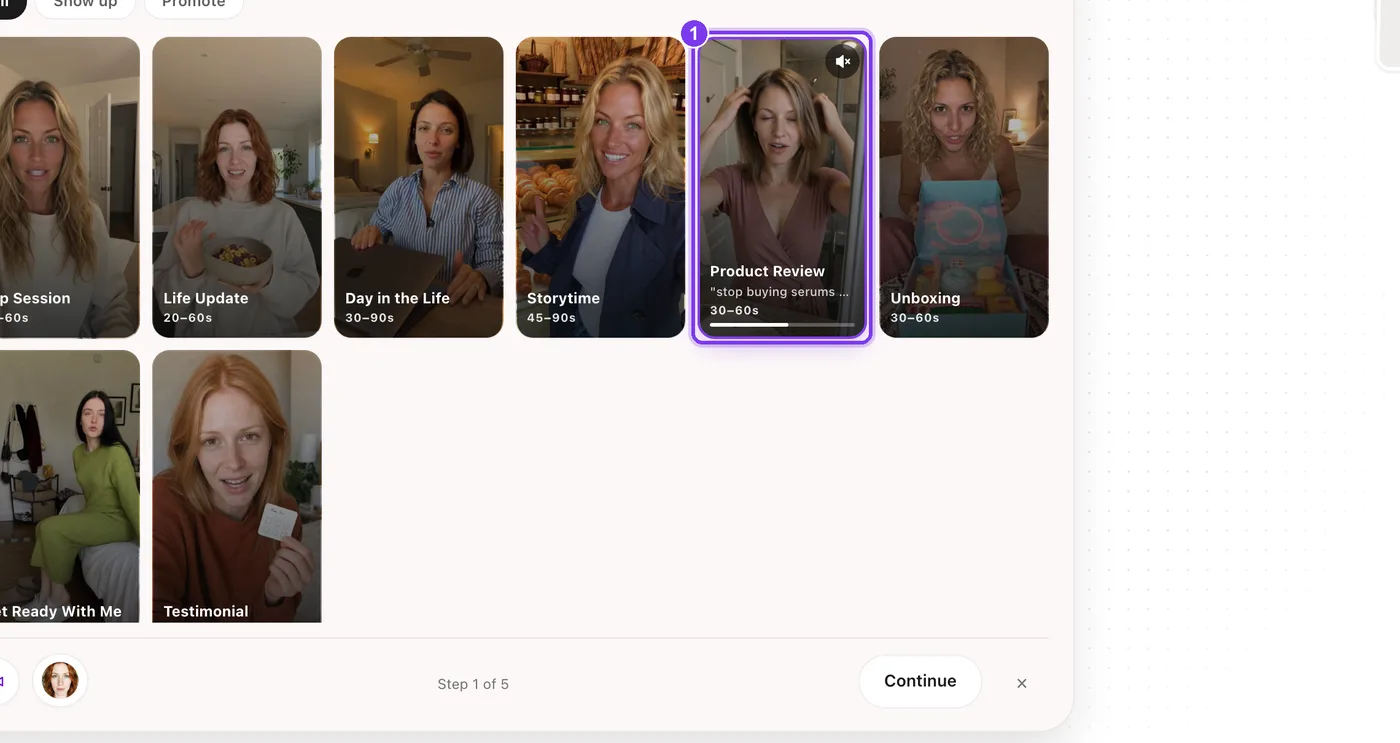
In the app. Choose a format (1). Each tile shows the length it usually runs. - Fill in the brief Each format asks for what it needs. A product review asks for product photos, what the product is and the key points, then lets you pick a length, a verdict and how it closes.
- Set the look Video control sets the Shot style, the Aesthetic and the Setting, outfit & props.
- Review the script Sozee writes the script from your brief. Read it, change anything that doesn't sound like your character and press Approve script.
- Set the output and generate Choose the shape (9:16, 4:5 or 1:1), the resolution and the captions (None, Clean, Bold or Karaoke). The length follows the script. Press Generate.
Which format to pick
| If you want to… | Try |
|---|---|
| Talk about anything, casually | Yap Session or Life Update |
| Show a day or a routine | Day in the Life or Get Ready With Me |
| Tell a story people watch to the end | Storytime |
| Sell or recommend something | Product Review, Unboxing or Testimonial |
The Show up and Promote filters above the tiles split the formats into everyday posts and ones built to sell.
Writing a brief that gives a good script
Too vague
Product: “moisturizer”. Key points: “it's good”. The script has nothing specific to say.
Specific
Product: “a face moisturizer in a pump bottle”. Key points: “absorbs fast, no sticky feel, skin feels softer after a week, use it morning and night”. Now the script has real things to say.
Cost
A UGC video costs 1 credit for every 7.5 seconds, with a minimum of 4 credits, so a 30-second video costs 4 credits and a 60-second video costs 8. The price shows on Generate before anything is made.
Want to use a video you've seen instead? Clone Reel gives you the same movement and cuts with your character. See other ways to start a video.
Pick a format and let your character do the talking. Open Create
Related guides
- Text to video AI: make a video from an idea — Text to video AI in Sozee: describe a scene in plain words, pin a setting or outfit, review the expanded prompt and get a video starring your character.
- Image to video AI: turn a photo into a video — Image to video AI in Sozee: pick a photo from your Vault, describe the motion, choose length and quality, and turn it into a video of your character.
- AI voice clone: give your character a voice — Make an AI voice clone for your character in Sozee: record or upload a 15 to 30 second sample, save the voice, then make voice notes in that voice.